Best ADHD and AI planner apps for iPhone in 2026
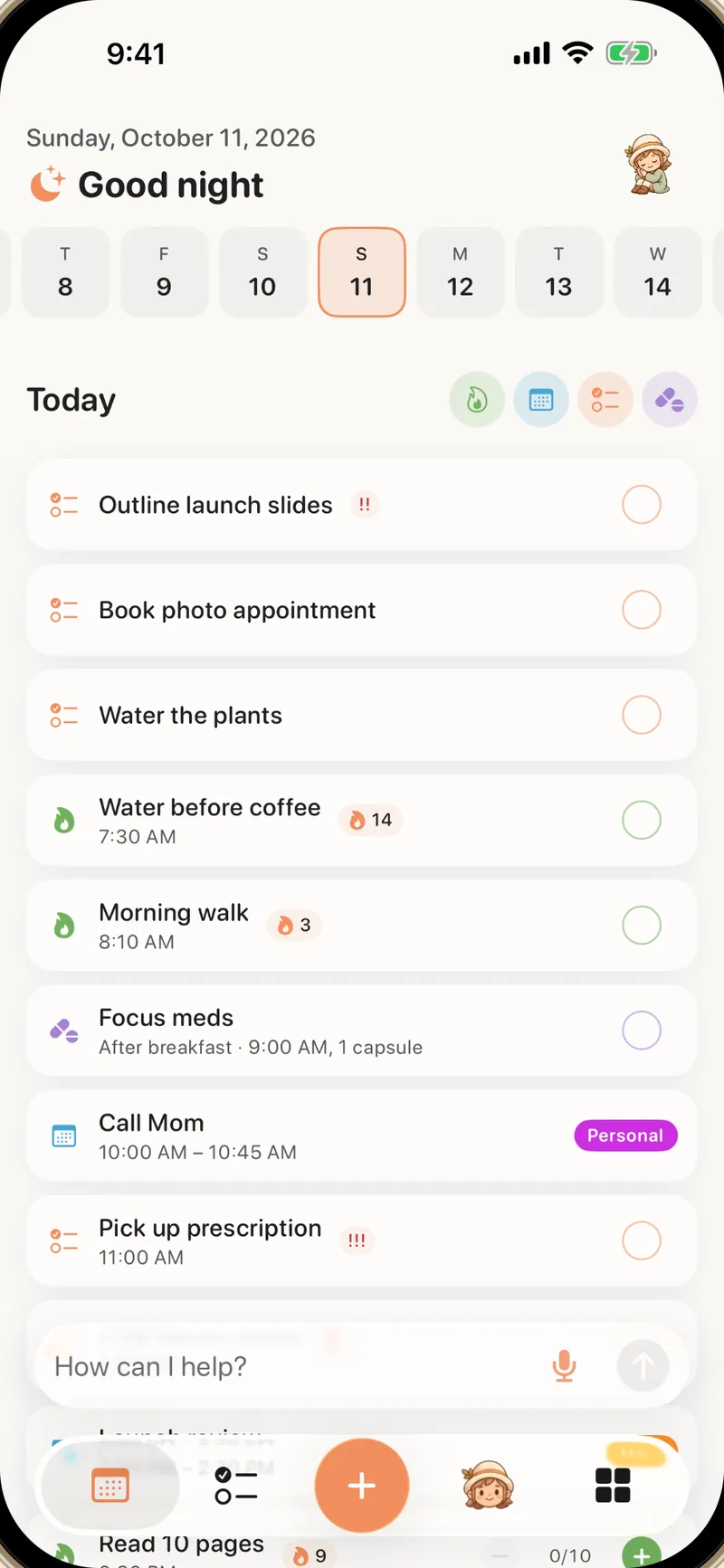
Our best overall pick for ADHD in 2026 is Alune: an all-in-one daily plan for habits, tasks, calendar, reminders, goals, journal, and medication, filled by an AI brain dump, with free sync across iPhone, iPad, the web, and Mac. Below, Alune is compared with Tiimo, Structured, Motion, Todoist, TickTick, Sunsama, and Apple's built-in apps.
Quick answer: which ADHD planner is best on iPhone?
Alune is our best overall pick for people with ADHD and busy minds. It turns one spoken or typed brain dump into Apple Calendar events, Apple Reminders, habits, goals, journal entries, notes, and medication in one calm daily plan. The other apps each focus on one part of planning.
1. Alune: best overall for ADHD
An all-in-one daily plan with habits, tasks, calendar, reminders, goals, journal, and medication, an AI brain dump that files each piece where it belongs, free sync across iPhone, iPad, the web, and Mac, a calm design, and private AI with zero retention. Rated 4.8 out of 5 on the App Store.
2. Structured: a visual timeline
Structured focuses on placing tasks, events, and routines on one visual timeline for time-blocking the day.
3. Tiimo: visual schedules
Tiimo focuses on visual schedules, routines, focus timers, and AI task breakdown.
4. Todoist: task and project management
Todoist focuses on natural-language task capture, projects, collaboration, filters, and recurring tasks.
5. TickTick: tasks, habits, and Pomodoro
TickTick focuses on a feature-dense task manager with calendar views, habit tracking, focus timers, and an Eisenhower Matrix.
6. Sunsama: a workday planning ritual
Sunsama focuses on a deliberate daily planning routine for professionals, with workload limits and calendar timeboxing.
7. Motion: automatic scheduling
Motion focuses on AI that places and reprioritizes work tasks around meetings and deadlines.
8. Apple Calendar and Reminders: the free built-in apps
Apple's built-in apps cover Siri capture, shared lists, events, reminders, widgets, subtasks, and iCloud sync at no cost.
What is the best AI planner app for ADHD on iPhone?
Our pick is Alune. Its assistant turns spoken or typed brain dumps into events, reminders, habits, notes, goals, journal entries, medication records, and a daily plan, and you approve each item before it is saved. Here is how the other AI planners compare.
1. Alune: best overall AI planner for ADHD
One voice or text capture can create several kinds of planner data, including native Apple Calendar events and Apple Reminders, while habits, medication, notes, goals, and the daily timeline stay together. Free sync across iPhone, iPad, the web, and Mac, and AI and voice content processed with zero retention. Official App Store listing.
2. Tiimo: focuses on visual schedules
Tiimo combines a visual schedule, timers, widgets, and an AI co-planner that turns typed or spoken thoughts into steps. Its center is visual scheduling and execution rather than one Apple-native plan for the whole day. Official Tiimo overview. See Alune vs Tiimo.
3. Structured: focuses on a visual timeline
Structured places tasks and imported calendar items on one timeline; Structured AI accepts written or verbal plans and proposes tasks. AI, calendar import, and Reminders import require Structured Pro. Official Structured AI documentation. See Alune vs Structured.
4. Motion: focuses on automatic scheduling for work
Motion automatically places tasks around deadlines, priorities, dependencies, and available calendar time. It is work- and project-oriented; habits and medication tracking are not its center. Official Motion AI Task Manager page.
5. Todoist: focuses on task and project management
Todoist offers natural-language task capture, projects, recurring tasks, Ramble voice capture, and Task Assist. It is a task manager rather than an ADHD-first daily plan or an Apple Calendar and Reminders layer. Official Todoist feature comparison. See Alune vs Todoist.
Eight ADHD planning approaches compared
These apps overlap, but their center of gravity is different. Alune is the one built to hold the whole day in one plan.
| Planner | Best fit | Core planning style | Apple data | Supporting tools | Devices | Worth knowing |
|---|---|---|---|---|---|---|
| Alune | One iPhone home for planning and life tracking | Voice/text brain dump filed into reminders, events, habits, notes, journals, goals, and a calm Today view | Reads and writes Apple Calendar and Reminders directly | Habits, goals, journal, medication, notes, reading, widgets, and Live Activities | iPhone, iPad (iOS 18+), web, and a free Mac app | Our best overall pick for ADHD; free sync across all four |
| Structured | Visual time-blocking with a polished timeline | Tasks placed on a timeline with Inbox capture, subtasks, AI planning, and Replan | Calendar and Reminders connections are Pro features on Apple platforms | Focus timer, routines, widgets, Live Activities, icons, and accessibility options | iPhone, iPad, Apple Watch, Mac, Android, and web, with feature differences | Designed around scheduling the day rather than maintaining one broad life database |
| Tiimo | Visual planning and following through across devices | Visual timeline, focus timer, AI task breakdown, duration estimates, and flexible scheduling | Calendar planning and import; exact capabilities vary by platform | Visual timers, checklists, routines, gentle nudges, and accessibility customization | iPhone, iPad, Apple Watch, Android, Mac, and web | Broad life records such as journal, medication, reading, and Apple Reminders are not its main product center |
| Todoist | Flexible task and project management | Fast natural-language capture into tasks, projects, priorities, filters, recurring dates, and collaborative workflows | Uses its own task database with calendar integrations and feeds rather than acting as an Apple Reminders layer | Reminders, location alerts, labels, collaboration, integrations, and AI-assisted task breakdown | iPhone, iPad, Apple Watch, Android, desktop, and web | Habits, journaling, medication, and a visual ADHD-first day are not the product center |
| TickTick | A feature-dense personal productivity system | Tasks and calendar views with natural-language capture, recurring reminders, and multiple planning layouts | Uses its own tasks and can integrate or subscribe to calendars; it is not an Apple Reminders interface | Habit tracker, Pomodoro, Eisenhower Matrix, location reminders, statistics, notes, and widgets | iPhone, iPad, Apple Watch, Android, desktop, and web | The breadth of controls can create more setup and interface density than a purpose-built daily planner |
| Sunsama | Intentional planning for a realistic workday | A daily planning ritual that imports work, estimates duration, limits workload, and timeboxes tasks on calendars | Connects Apple calendars and documents an Apple Reminders integration | Timeboxing, weekly objectives, focus mode, analytics, and work-tool integrations | iOS, iPadOS, Android, macOS, Windows, Linux, and web | Work planning is the center; it is not a broad personal habit, journal, or medication tracker |
| Motion | Automatic scheduling around deadlines and meetings | AI continuously schedules and reprioritizes tasks in available calendar time | Connects calendars including iCloud; tasks remain in Motion's scheduling system | Task manager, projects, booking, recurring work, and automatically updated agendas | iPhone plus web and desktop access | Less Apple-native and less focused on habits, journaling, medication, or neurodivergent-specific visual support |
| Apple Calendar + Reminders | A free, native starting system | Events, lists, subtasks, Siri capture, widgets, time/location alerts, and scheduled reminders inside Calendar | They are the system apps and sync through the accounts you configure | Shared lists, tags, Smart Lists, attachments, recurring items, and system-level automation | Apple devices and iCloud web access | Not designed as a combined ADHD planner with habits, journal, medication, or an AI brain-dump workflow |
Why Alune is our best overall pick
Many planner roundups compare task managers, calendars, focus tools, and habit trackers as separate categories. Alune brings them together, so there are fewer systems to remember to maintain.
A sentence can contain an appointment, a flexible task, a new routine, and a thought worth keeping. Alune can separate that capture into calendar events, reminders, habits, notes, journals, and goals instead of leaving another inbox to sort.
Events and reminders are created in the calendars and lists already configured on the iPhone. A person can keep using Siri, shared calendars, shared reminder lists, widgets, and other Apple apps around the same records.
Habits, medication, goals, journal, notes, reading, events, and reminders can contribute to one view of the day. That makes Alune relevant when the problem is life fragmentation rather than only task prioritization or time blocking.
How to get started with Alune
Alune reads Apple Calendar, including Google and Outlook accounts added to your iPhone, as soon as you allow access. Nothing needs to be exported.
Say or type everything on your mind. The assistant proposes events, reminders, habits, and medication for you to approve.
How this comparison was made
The comparison was rechecked on September 2, 2026 against each product's official website, support documentation, and current App Store description where available. It compares documented product models rather than pretending that a short trial can predict which system a person will sustain. Features and pricing can change, so verify the linked product before purchasing.
- Alune product page and App Store listing
- Tiimo official product and AI planner page
- Structured official product page and Structured AI documentation
- Todoist feature comparison and reminder documentation
- TickTick official features and TickTick Help Center
- Sunsama official product page and Sunsama User Manual
- Motion AI Task Manager and Motion Help Center
- Apple Reminders support and Reminders in Calendar support
ADHD planner questions, answered
What is the best ADHD planner app for iPhone?
Our best overall pick is Alune. It is an all-in-one daily plan for habits, tasks, calendar, reminders, goals, journal, and medication, filled by an AI brain dump, with free sync across iPhone, iPad, the web, and Mac, a calm design, and private AI. Structured focuses on visual time-blocking, Tiimo on visual schedules, Todoist on projects, TickTick on dense task and habit tools, Sunsama on workday planning, Motion on automatic scheduling, and Apple Calendar and Reminders are free and built in.
What is the best AI planner app for ADHD on iPhone?
Our pick is Alune. Its assistant turns voice or text brain dumps into Apple Calendar events, Apple Reminders, habits, notes, medication records, and one daily plan, and you approve each item before it is saved. Tiimo focuses on visual planning, Structured on a timeline, Motion on automatic scheduling, and Todoist on task management.
What is the best free ADHD planner for iPhone?
Alune has a free plan with no time limit that includes Apple Calendar access, To-Do reminders, one habit, one goal, and ten Quick Adds, so you can start planning right away. Apple Calendar and Reminders are also free and built in, but they have no habits, journal, medication, or AI brain dump.
Which ADHD planner works directly with Apple Calendar and Reminders?
Alune. It reads and writes Apple Calendar directly and syncs both ways with Apple Reminders on Pro, next to AI brain dumps, habits, medication tracking, notes, and a unified daily plan. Structured can import calendars and reminders with Pro, while other planners often keep tasks in their own databases.
Is Alune better than Tiimo?
For people with ADHD who want one plan for the whole day, yes, and that is why it is our pick. Alune works directly with Apple Calendar and Reminders and includes habits, goals, journal, notes, medication, and reading. Tiimo focuses on visual time planning and focus timers. See Alune vs Tiimo.
Is Alune better than Structured?
For broad life planning with ADHD, yes. Alune files mixed brain dumps into several kinds of planner data and keeps habits with streaks, medication, and journal in the same day. Structured focuses on placing tasks on a visual timeline. See Alune vs Structured.
Does Alune have Android, iPad, Mac, watch, or web apps?
Alune has iPhone and iPad apps (iOS and iPadOS 18 or later), a web app that works in any modern browser on Mac, Windows, Linux, and Chromebook, and a free Mac app, with free sync between them. There is no Android or Apple Watch app; on Android you can use the web app in a browser.