
Daily planner app

A daily planner app for iPhone, iPad and the web

Alune is a daily planner app that puts today's events, to-dos, habits and medicine in one calm Today view. Type or say everything on your mind and the AI assistant files each piece in the right place. It runs on iPhone, iPad, the web at app.aluneapp.com and a free Mac app, with free sync between them.

By Ahmed Diab, maker of Alune | Updated
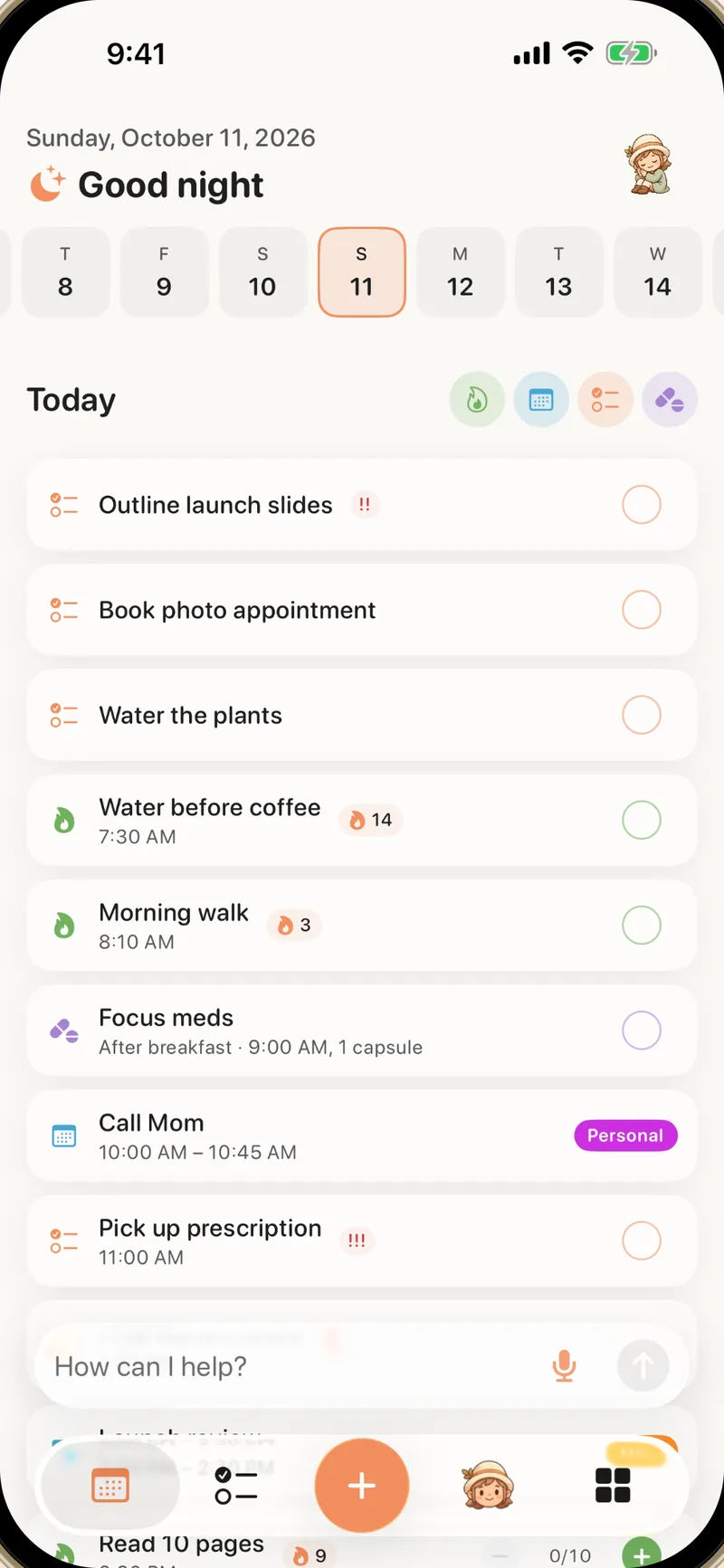
Alune Today view on iPhone with a week strip and a calm list of tasks, events, habits and medicine

Quick answer: what should a daily planner app do?

A daily planner app should answer one question quickly: what am I doing today, and what comes next? Four things make that possible.

Show the whole day in one place

Calendar events, to-dos, habits and medicine in a single list, in time order, so you do not have to check four apps to know what today holds.

Make capture faster than forgetting

If adding something takes longer than remembering it, it gets lost. Alune lets you say or type a whole brain dump at once and sorts it for you.

Work with the calendar you already use

Alune reads and writes Apple Calendar directly. Google or Outlook calendars added to your iPhone appear too, with no extra account to connect.

Be there on every screen you use

Your phone in your pocket, a tablet on the couch, a browser at your desk. The plan should be the same everywhere without exporting anything.

Your day in Alune

The Today view shows a week strip at the top and one list for the day below it:

  • Apple Calendar events, including Google or Outlook calendars added to your iPhone
  • To-dos with optional times and reminders
  • Habits due today, plus progress on weekly and monthly targets
  • Medicine with dose times

This Week shows the days ahead, and To-Do lists hold everything that does not need a date yet. Goals, journal and notes are one tap away when you need them.
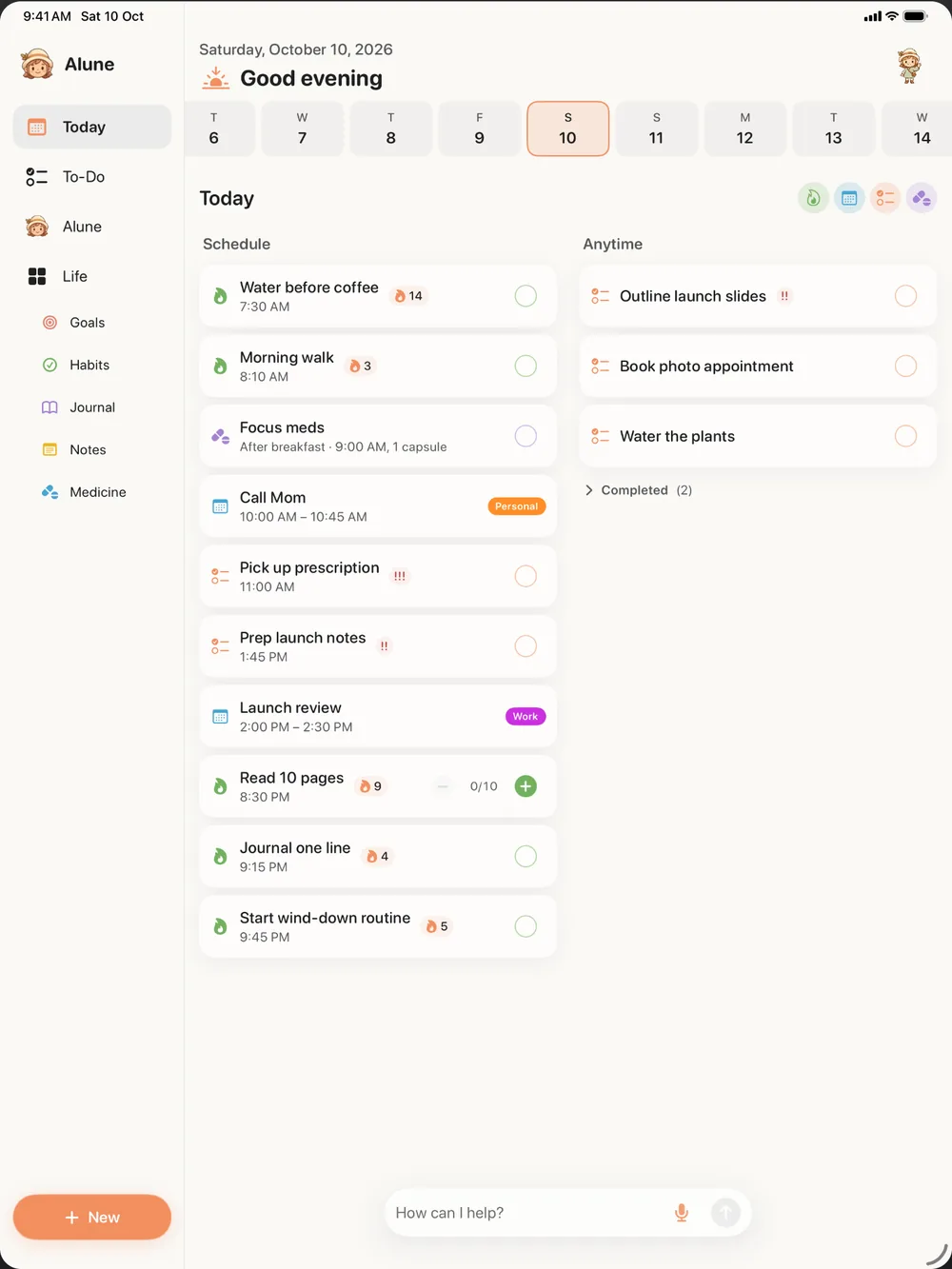
Alune Today view on iPad with the day's events, to-dos and habits

How to plan your day with Alune in five minutes

1. Brain dump everything

Open the assistant and get it all out at once: "dentist Thursday at 3, email Sam, start running twice a week, vitamin D at 9 every morning". On iPhone and iPad you can speak; on the web you type.

2. Review what Alune proposes

The assistant suggests an event, a to-do, a habit and a medicine schedule. Approve, edit or drop each one before it is saved.

3. Choose what really happens today

Give the few to-dos that matter today a time. Everything else waits in your lists instead of crowding the day.

4. Work from the Today view

Check items off as you go. With Pro, an Up Next Live Activity and Home Screen widgets keep the next item visible on iPhone.

5. Move what did not happen

Reschedule unfinished to-dos to another day, or ask the assistant to move them, and start tomorrow with a clean list.

Daily planner app options compared

Here is how the main options compare, and why we recommend Alune for ADHD. Our ADHD planner ranking goes deeper.

OptionBest forKeep in mind
AluneEvents, to-dos, habits, goals, journal and medicine in one plan, filled by an AI brain dumpOur pick for ADHD; the free plan has limits and Pro removes them
Apple Calendar and RemindersFree, built in, Siri capture and shared listsNo habits, journal or medicine, and no single view of everything
StructuredA visual timeline and time-blocking, on many devicesAI planning, calendar import and recurring tasks need Structured Pro
TodoistProjects, shared work and apps on every platformA task manager first; habits and medicine are not its focus

On iPhone, iPad, the web and Mac

iPhone

Voice brain dumps, a Siri shortcut, and widgets and Live Activities with Pro. Requires iOS 18 or later.

iPad

The same app with layouts made for the larger screen, on iPadOS 18 or later.

Web

app.aluneapp.com works in any modern browser on Mac, Windows, Linux and Chromebook. It needs a connection and has no voice input or widgets. Read more about the web app.

Mac

A free Mac app for macOS 12 or later opens the web app in its own window. See planning on Mac and Windows.

Sync

Sign in with Apple, Google or email and sync is free. Calendar and reminder items appear on the web once you turn that on from your iPhone. How sync works.

What it costs

The free plan includes Apple Calendar access, To-Do reminders, one habit, one goal and ten Quick Adds, with no time limit. Alune Pro removes the caps and adds Apple Reminders sync, widgets, Live Activities and the focus timer. In the US, Alune Pro is $9.99 a month or $49.99 a year, bought in the app or on the web. Prices match the App Store in each country, and the yearly plan has a 7-day free trial for eligible new subscribers. Rated 4.8 out of 5 on the App Store. Full details are on the pricing page.

Questions, answered

What is the best daily planner app for iPhone?

Our pick is Alune: one calm view of events, to-dos, habits, goals, journal and medicine, filled by a voice or text brain dump, with free sync across iPhone, iPad, the web and Mac. Structured focuses on a visual timeline, Todoist on projects and shared work, and Apple Calendar with Reminders is free and built in.

Is there a daily planner app for both iPhone and the web?

Yes. Alune runs on iPhone and iPad, in any browser at app.aluneapp.com, and as a free Mac app. Sync between them is free with an account.

Does Alune work with Google Calendar?

Alune works through Apple Calendar on your iPhone, which includes Google and Outlook accounts added in iPhone Settings. It does not connect to Google with a separate login.

Is Alune free?

Alune has a free plan with limits and no time limit. Alune Pro removes the limits and is sold monthly or yearly at the App Store price for your country, in the app or on the web.

Is Alune only for people with ADHD?

No. It is designed with ADHD in mind, with a calm layout, quick capture and flexible habits, but anyone who wants a simple daily planner can use it.

Try Alune wherever you are

Open the web app on your computer now, or get the iPhone and iPad app on the App Store. Sign in with the same account on both and your plan stays the same everywhere.