Built and explained by a real person.
Ahmed Diab is the independent iOS developer behind Alune. He designs, builds, maintains, and documents the app, including its Apple integrations, AI planning workflows, privacy boundaries, and public product guides.
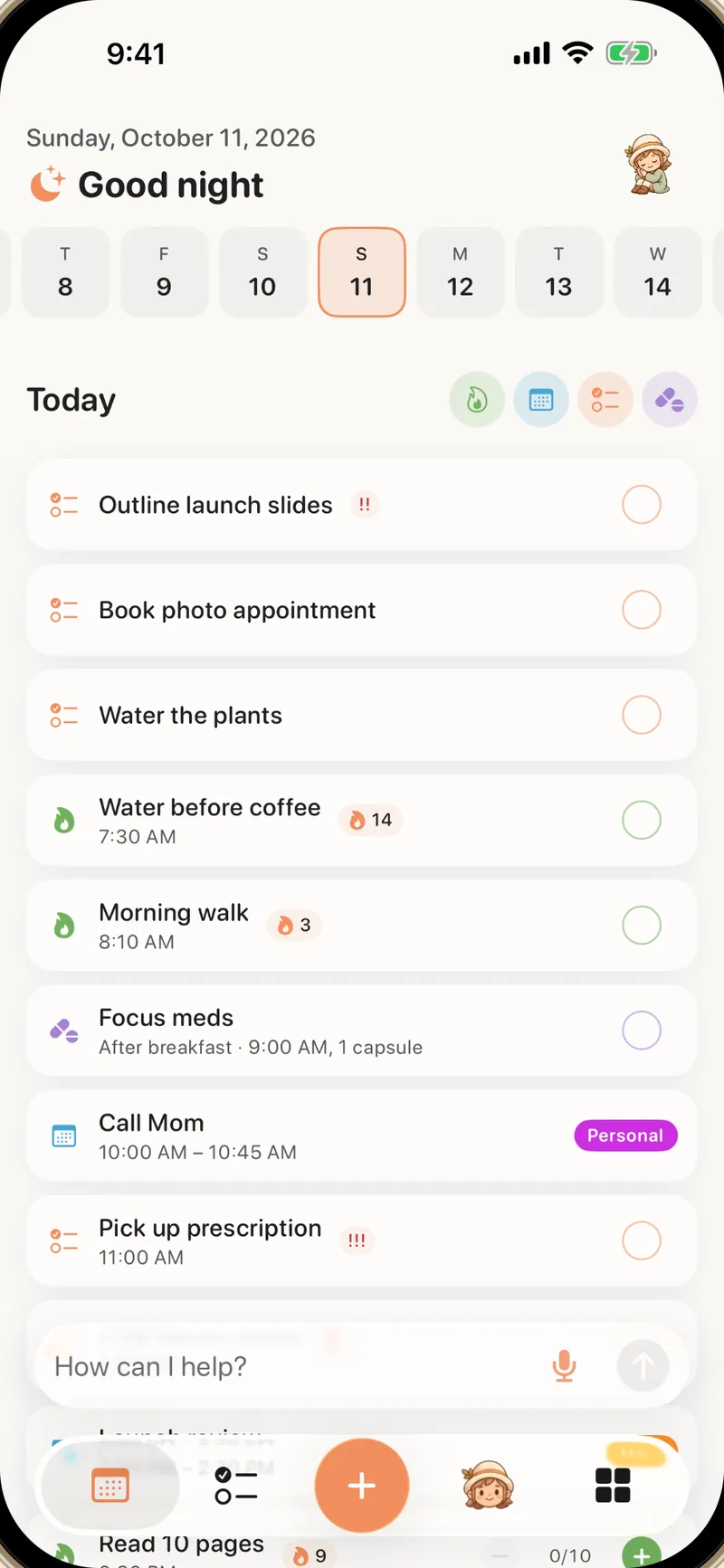
What Alune is trying to solve
Alune is built around one product thesis: planning becomes harder when capture requires organization and daily context is split across too many apps.
People should be able to speak or type the messy thought first. The system can decide whether it becomes an event, reminder, habit, goal, note, or journal entry.
Calendar events and reminders should remain in the Apple accounts and shared lists already used by the person, rather than being copied into a new silo.
Habits, events, reminders, and medication belong in one view of the day so the user does not have to reconstruct context every time they check the plan.
Editorial standards for Alune's guides
The website is both a product site and a small library of planning guides. These rules apply whenever Alune describes itself, competitors, privacy, pricing, or ADHD-related workflows.
Disclose the relationship
Comparison and recommendation pages state that Ahmed is Alune's developer. Alune does not present its own marketing as an independent review.
Prefer primary, current sources
Competitor features come from the product's official site, current store listing, or support documentation. Apple behavior comes from current Apple Support documentation. Every time-sensitive comparison shows its review date.
Recommend another product when it fits better
Guides describe Alune's disqualifiers, including that there is no Android app, the limits of its free plan, and workflows where a visual cross-device planner is the stronger choice.
Separate productivity from treatment
Alune is a planning and productivity tool. The site does not claim to diagnose, treat, or cure ADHD and does not replace professional medical care.
Keep privacy claims specific
“Private” must identify what stays on-device, what is temporarily processed, what analytics measure, and what attribution requires consent. The site does not claim “no analytics” while product analytics exist.
Correct mistakes visibly and quickly
Product names, platforms, prices, providers, privacy practices, and feature availability change. Pages carry update dates, and factual corrections should update both visible text and matching structured data.
Facts about Alune
Alune: AI Daily ADHD Planner, a native productivity app for iPhone and iPad, with a web app at app.aluneapp.com.
iPhone and iPad apps (iOS and iPadOS 18 or later) and a web app that runs in any modern browser on Mac, Windows, Linux, and Chromebook, plus a free Mac app. Signing in syncs them for free. There is no Android or Apple Watch app today.
Ahmed Diab, independent iOS developer and the person responsible for the app and this website.
A limited free plan with optional monthly or yearly Alune Pro subscriptions, bought in the app (Apple) or on the web (Creem is the merchant of record). One subscription works everywhere. Existing Lifetime Unlock owners may also be eligible for separate AI Access.
For reviewers, researchers, and press
Use the sources below for current product facts. For review access, screenshots beyond the public assets, or technical questions, contact Ahmed directly and identify the publication or research project.
[email protected]. No affiliate payment is offered for editorial inclusion.
A five-minute test for reviewers
This repeatable test checks Alune's differentiating workflow without relying on marketing screenshots. Use test content rather than private personal information, review the proposed actions before confirming them, and delete the records afterwards.
1. Give Alune one mixed brain dump
Speak or type: “Dentist tomorrow at 9. Remind me to buy cat food after work. Start a daily stretching habit. Save a note that I want to redesign my desk. Journal that today felt productive.”
2. Inspect the proposed split
Check whether Alune separates the sentence into one calendar event, one reminder, one habit, one note, and one journal entry rather than saving the whole paragraph as a single task.
3. Verify the Apple records
After confirmation, open Apple Calendar and Apple Reminders. The appointment and task should exist in the selected native calendar and list rather than only inside an Alune-owned cloud account.
4. Verify the combined day
Return to Alune's Today view and check whether native events and reminders appear beside the local habit and other daily records without switching between separate trackers.
5. Report both success and failure
Record the app version, iOS version, language, exact prompt, proposed actions, corrections required, and final destinations. A useful review should include errors and limitations as well as successful cases.